

Email newsletters and reminders, written for your firm
Twelve emails a year,
not one in March
AccrueNest handles email marketing for accounting firms: a monthly newsletter we write in your firm's voice, the January kickoff and the deadline reminders, for US firms of 1 to 10 people. Every issue reaches only readers who signed up or said yes to your emails.
- Deadline reminders set to your firm's dates
- Two lists, kept separate


Live in 14 daysMonth to month, no setup fee
- Reminders timed to your firm's own calendar
- Written in your voice
- Office closures and drop-off dates
- No charge for each send
Three hundred clients, one email a year
A tax office has 300 past clients on file. They hear from the firm once, in March, when the organizer goes out, and a few move to another preparer without a word.

Readers who opted in
Clients and prospects who asked for your firm's emails, and nobody from a bought list.

Two lists
Return clients without your consent form get tax news, general business news and offers to prepare next year's return. Clients who signed it can also hear about bookkeeping and advisory.
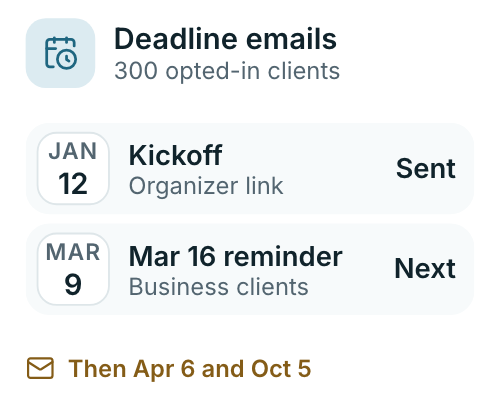
Reminders before each deadline
The January kickoff with the organizer link, reminders before the March and April deadlines, and one before October 15 for extensions.
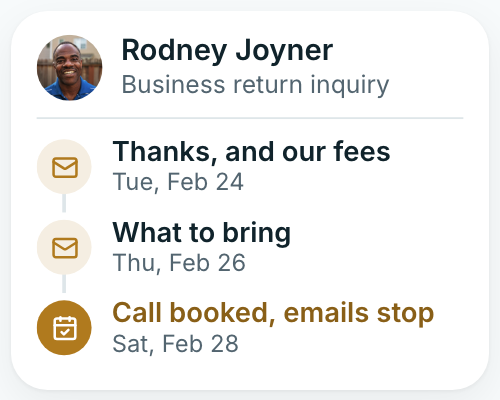
Inquiry series
New inquiries get a short run of emails that ends once they book, and stops at the first no.


The writing, the sends and both lists come with every plan
Each plan includes everything. The monthly price follows the headcount that signs in, starting at $97 for one person.

Who writes your newsletter
A writer on our team drafts each issue from your dates, fees and news. Imogen sets up both lists with you and goes over the sends on your monthly call.
Imogen Pritchard
Account manager
Your newsletter writer
Drafts each month's issue
Our setup team
Builds and checks both lists
What goes out
Every send has a reason and a date
Some emails go out on a set date, like the January kickoff. Others go out when something happens, like a new inquiry from your website.
Monthly issue
Deadlines, law changes and one planning tip, every month
Each month our writer drafts an issue in your firm's voice: what's due, what changed in the tax law and one planning tip worth acting on. Your own news goes in too, such as a new preparer, holiday hours or a second office.
- Each issue opens with the next due date and who it affects, written for the business owners and families on your list
- Law changes are explained in short paragraphs, not code sections, with a date
- Planning tips point readers to a meeting with your firm

Kickoff
In January, last year's clients get their organizer link without phoning for it
Early in January, last year's return clients get the season kickoff: what's new this year, how to book a drop-off and a link to their tax organizer. Calls from it ring on a tracking number set aside for the kickoff, so the report counts them.
- The organizer link opens without a password, straight from the email
- Clients with no booking and no organizer back by February get a second note with the link, and nobody else does
- Your fees for the season appear as your firm publishes them
- Replies to the kickoff land in your firm's inbox beside every other message from that client

Sign-ups
A sign-up box on your website, with the agreement written out
Visitors who want the newsletter fill in a short box on your website and tick a box saying yes to your firm's emails. New clients can say yes on their intake form too. Nobody joins the list from a purchased file.
- The box sits at the foot of each service page and blog post
- Each sign-up is saved with the date, the page and the exact words the person agreed to on the form, for your records
- Prospects who booked an intro call but never engaged stay on the list they agreed to until they opt out
- One click in any issue takes a reader off the list

Deadline reminders
Reminders before March 15, April 15 and October 15
Each reminder is written once with your dates and sent on its day. Business clients hear about March 15, individuals about April 15, and anyone on extension about October 15, weeks ahead.
- Estimated tax payment reminders arrive a week before each quarter's date, for clients who pay them
- The April note names your last drop-off day and your cutoff
- Closed for a holiday? Clients hear about it several days ahead
- Bookkeeping firms send month-end and year-end reminders the same way for receipts and statements

Offers
Offers of bookkeeping, payroll or advisory, sent to the consented list
Newsletters and reminders go only to people your firm chooses, and a list that sells more than return preparation follows your firm's own consent rules for tax return information. So the offer of monthly bookkeeping goes to the second list, never the first.
- Return clients without consent hear tax news and return offers and nothing beyond
- A year-end planning invitation stays on tax planning, or it goes to the consented list
- Your consent form travels with the engagement letter, as a separate page
- Advisory and payroll offers name the service plainly, with your published fee

Inquiry series
A short series for every new inquiry
Someone asks about a business return on your website on a Tuesday. By the following Tuesday they've had a few short emails: your fees, what to bring, how an intro call works, with a booking link in each.
- Each email settles one thing callers ask about, like fees
- The series ends once they book an intro call
- Any reply goes to your firm's inbox, and the series pauses so staff can answer
- A no thanks or an unsubscribe at any point stops every email after it to that person
- Your staff can add a prospect by hand after a call
- New inquiries from ads get the same series, labeled with the campaign

Getting started
Your list, sorted before the first issue
You send us your client list and the dates that matter. We sort it into two lists, set the reminders and write the first issue.
Step one
Import
Every client and prospect comes over from a spreadsheet or your current email tool, with each person's sign-up date and how they said yes.
Your contacts, brought over
Step two
Two lists
We split the contacts in two: return clients who never signed your consent form, and everyone who did or never filed with you. Only the second list hears about bookkeeping, payroll and advisory.
Sorted by your consent
Step three
Dates
Your kickoff date, the deadline reminders, office closures and the October 15 extension reminder are written once and placed on their dates.
Set to your firm's calendar
Step four
First issue
Our writer drafts the first monthly issue from your fees, your team and the season ahead. Any change you ask for is made before it sends, and later issues go out on a fixed weekday each month.
Drafted from your own news
Monthly
Report
Opens, clicks and unsubscribes for each send, plus replies and meetings booked from it, are covered on your monthly call with Imogen.
Gone over on the monthly call
Topics clients would otherwise call about
Topics for the year's issues
when are estimates due in September
Due dates
The quarterly reminder, with the date.
new tax law this year
Law changes
What changed, in plain words.
file an extension deadline
Extensions
The October 15 reminder, sent early.
midyear tax planning for business owners
Summer
A planning tip before fall.
is this IRS letter real
Notices
What to do when a letter arrives.
deductions for my LLC
Small business
Year-end moves for business owners.
child tax credit this year
Families
Credits and changes for households.
my accountant's holiday hours this week
Your office
Closures, new staff, new office.
year end planning meeting
Planning meetings
An autumn invitation to sit down together.
One list, twelve issues
We'll check who your firm emails today, which of them opted in and which signed your consent form, then sketch a year of issues around your deadlines. Month to month, no setup fee, live in 14 days.


Newsletters, from the firms that send them

Cornelius B.Owner of a CPA firm 31fall meetingsWe used to email clients in January and then go quiet. The monthly issue goes out on time, and the planning tip fills our fall meetings.

Ezequiel M.Enrolled agent, tax office 52%organizers back by FebruaryThe kickoff went to last year's clients with the organizer link on January 6, and half of them sent it back before February.

Annika L.Owner of a bookkeeping firm 3cleanups signed from emailOur issue covers month-end dates and payroll deadlines. Clients who consented also hear about our cleanup packages, and three signed this spring.

Marguerite D.Office manager, CPA firm 6 weeksearlier start on extension returnsI set office closures and the extension reminder once. They send on schedule, and the October work now starts in August instead of the week of the deadline.

Prakash S.Tax preparer, tax and accounting office 8 daysearlier on final documentsClients read the April reminder and send the last 1099 before I ask. I spend fewer evenings in April waiting on one missing form.

Thuy N.Client services lead, tax office 4 emailsin each inquiry's seriesThe inquiry emails answer what I used to type out by hand: fees, documents to bring, turnaround. By the intro call they already know.


Newsletter questions
Asked before the first issue
Look up a topic, for instance kickoff or unsubscribes.
10 questions
Who writes the newsletter, and will it sound like our firm?
Our writers do, each month, in your firm's voice. Each issue covers what's due, what changed in the tax law and a planning tip, plus your own news: a new preparer, holiday hours, a second office. Ask for a change and our writer makes it before the send, and the next issue picks up what readers asked about.
Can we send deadline and extension reminders?
Yes. The January kickoff goes out with the organizer link, then reminders before the March and April deadlines, and an extension reminder ahead of October 15. Each one is written once with your dates and fees and sends on its day. Bookkeeping and payroll firms send month-end and quarterly reminders the same way, and office closures go out the week before.
Will it reach only people who opted in, and where does section 7216 fit?
Yes, only people who opted in to your firm's emails get it. For return clients, tax news and general business news fall within what section 7216 allows, while offering bookkeeping, payroll or advisory needs each client's consent. Those offers go only to the consented list.
Can new inquiries get a series of emails?
Yes. Prospects from your site, your calls and your ads get a short series that covers fees, what to bring and the booking link. It stops when they book, say no or unsubscribe.
Will a monthly newsletter make people unsubscribe?
Some will, and that's their right. An unsubscribe takes that reader off for good. We promise no rate. Short issues on a steady day, each with something a reader can use before a deadline, are worth staying subscribed for.
Can I see who opened each newsletter?
Yes. Each send shows who opened it, who clicked and who unsubscribed, and replies arrive in your firm's inbox. Imogen goes over the numbers on your monthly call, along with any meetings booked from an issue.
What does the newsletter cost us?
Nothing extra. Each plan includes everything. The monthly price follows the headcount that signs in, starting at $97 for one person.
Can we write an issue ourselves sometimes?
Yes. Send your draft or a few notes, and our writer shapes it into that month's issue or sends it as you wrote it. A message from the owner before tax season often reads best in the owner's own words.
Does a bigger list cost us more?
No. One flat fee each month. We never charge by the call, the inquiry, the client or the return, and we take no cut of what you bill. Sending to 2,000 people costs the same as sending to 200.
Is the list still ours if we leave AccrueNest?
It stays yours. Email us before the next charge and service ends once the month you paid is used up. Ad accounts remain yours, and a spreadsheet of all your contacts comes to you. Copies of past sends and who received them can be exported too.
Common topics here
Ask about newsletters
Email sales@accruenest.com with a past newsletter, or none at all, and Imogen will show you what a year of issues could look like.
Imogen PritchardAccount manager
Request a demo