

For the preparers and bookkeepers doing the work
Every form in,
except the last K-1Everything in, except the K-1
AccrueNest is software for the front half of the tax preparer workflow at US firms of 1 to 10 people: requests that keep reminding clients until every document is in, a board of what each return waits on, and client questions by text.
- Each document lands under its own name on the record
- Your tax software stays put

Live in 14 daysMonth to month, no setup fee
- Upload slot per document
- Deadline view
- Owner per return
- Stage texts to clients
- Invoices recorded in QuickBooks Online
- Beside Drake and Lacerte
It's March 3. The organizer went out in January, the W-2s came by email, a 1099 showed up as a phone photo, and the K-1 is still coming. Today the client writes that you should have everything now. Until a preparer opens the file, nobody knows what's missing. Here, each request keeps its own list instead.
The return sits half done
You start when it's all in
The same requests go out every month


Your screens
See which returns wait on which client
Three screens a preparer opens before starting a return.


Individual returns, business returns and monthly books each get a board. Cards move from Documents requested to Picked up, and each names who owns it and when it's due.
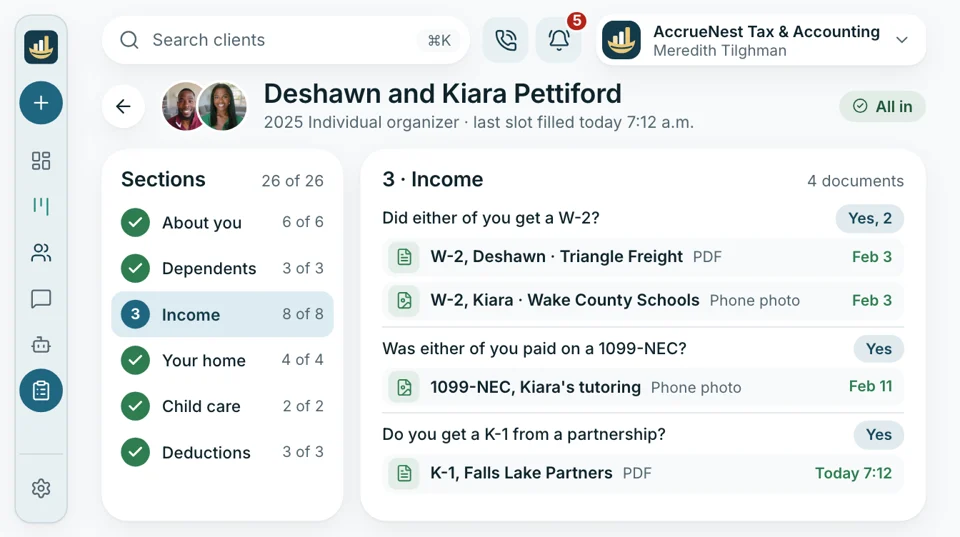
Open a client and the request shows every item asked for and which ones are marked received. The reminder text lists only what's still out, with the link to send it, so you can see why a return hasn't started.
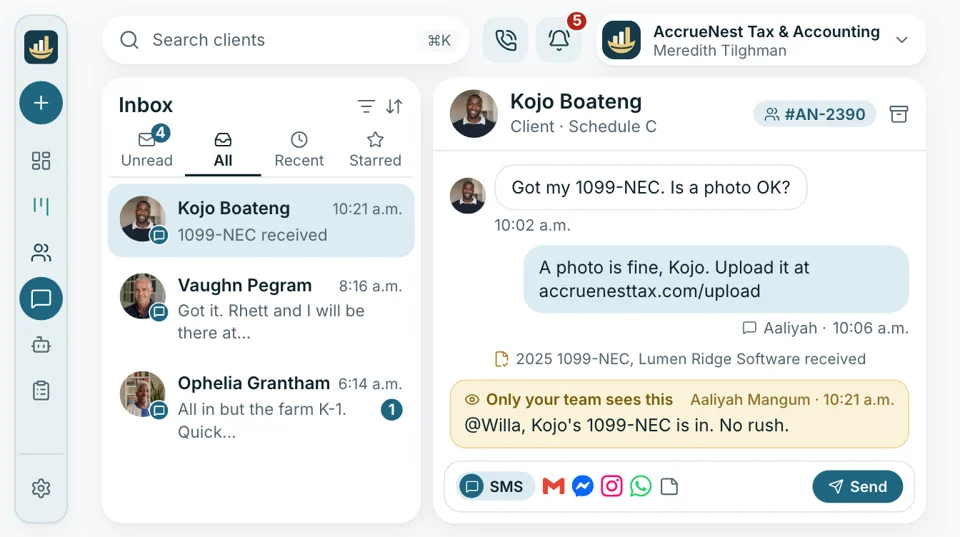
When a client has a question about their return, they text the firm's number. The text reaches the office's shared inbox; the front desk answers what it can and leaves you a note on the thread for the rest.
Season's sticking points
Where returns sit and wait
January 15
Documents in pieces
A couple's W-2s came by email in February, a 1099 as a sideways photo, and the K-1 is still on its way. Someone used to match each file to the client by hand. Now the organizer gives each document an upload slot of its own, so the W-2, 1099-NEC and K-1 land on the record under their names.
- No login: one tap on the text opens it
- Phone photos go straight in from the camera
March 3
“You should have everything now”
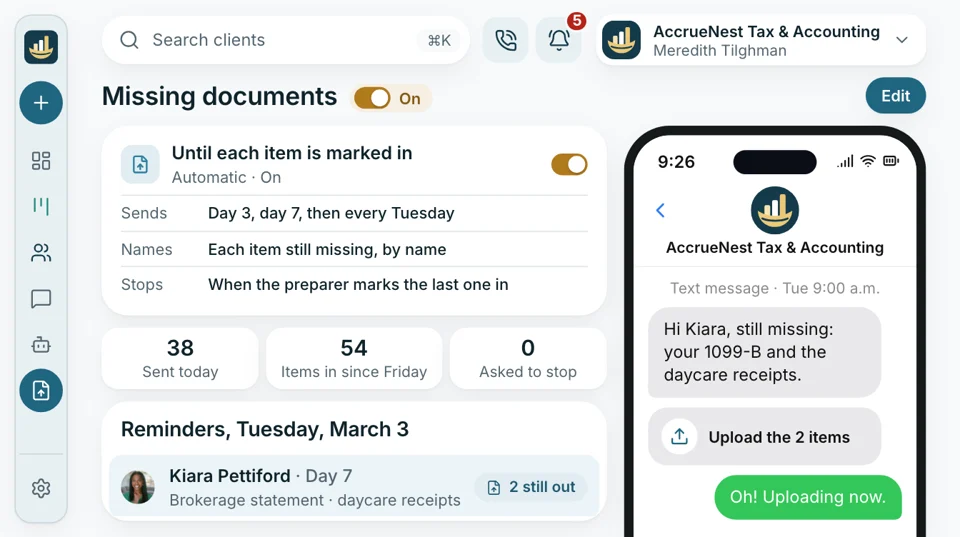
The brokerage statement and the daycare receipts are still missing. The reminder text names both, with the link to send them, and keeps going on day 7 and weekly until they're marked in.
- Day three: the first reminder lists each missing item
- Then weekly, until the last item is in
April 9
Finished returns waiting for pick-up
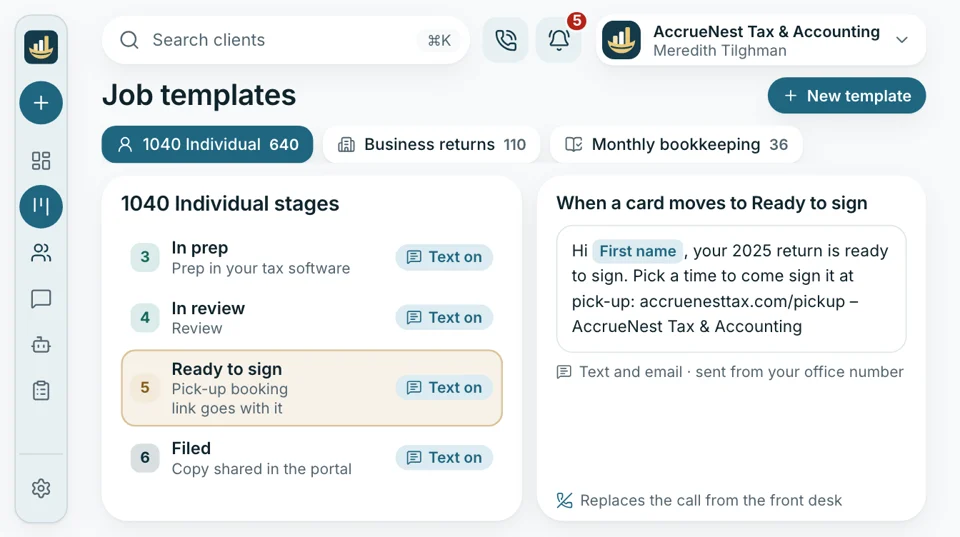
Before, the front desk phoned each client to say the return was ready, and played phone tag for days. Now the card moving to Ready to sign sends the client a text to choose their pick-up time, and they sign when they come in, as they do today.
- Pick-up appointments book from the link in that text too
- Clients sign the e-file form in your tax software's email, as today.
Interruptions
Questions wait on the thread, not your desk
A client stops by to ask whether their return is done, or texts your personal cell about a 1099. Now those questions reach the firm's number as texts, the front desk answers what it can, and anything for you sits on the thread until you finish the return in front of you.
- Status questions get answered from the stage you set on the board alone
- Your cell never appears on a client text


Included as well
- Extension clients on their own board
- Cards sorted by due date or owner
- Reviewer assigned when cards move
- Stage texts written for your firm
- Notes for staff on threads
- Monthly cards opened for you
Past the board, what the owner also gets
Preparers use one corner of it; the owner gets the site and the ads too. Each plan includes everything. The monthly price follows the headcount that signs in, starting at $97 for one person.

Preparers & Bookkeepers Requests that remind clients, a board of what's waiting, and questions held as texts.
You're hereOther parts worth seeing
- Reports Returns counted by stage, so the owner sees where the season stands each week.
- Phones The firm's number on your own phone, with your cell kept private.
- Website Your firm's site, designed and written by us and kept fast on phones.
- Online booking Drop-off, pick-up and year-end planning slots that clients book themselves, online or by text.
- Ads Tax season and year-end campaigns on Google and Facebook that we write and manage, with click charges going straight to your firm.
- Texting Clients text the office number; replies come from whoever is free, not your cell.
- Reviews Review requests by text, sent only to clients who signed your consent form.
Bring us one of your organizers
Send last year's organizer and the stages a return moves through at your firm. We'll turn the organizer into a phone form with an upload slot per document and lay your stages out as a board while you watch. Your tax software stays exactly where it is.


Overheard between two returns

Cornelius B.Owner of a CPA firm, Columbus Full filesbefore prepMy preparers used to open a return, stall on a missing K-1 and open another. Now nobody touches a file until it's complete.

Ezequiel M.Enrolled agent, San Antonio One boardevery morningI prepare most of the returns myself. Each morning the board shows me whose files are whole and who still owes a document.

Annika L.Bookkeeping firm owner, Minneapolis The 10thstatements inClients sent bank statements whenever they got around to it. Now the request goes out on the 1st, keeps reminding, and most have sent everything by the 10th.

Marguerite D.Office manager, New Orleans 1 lookat the boardI don't walk back to ask preparers about status anymore. I read the board, and the client already got a text.

Prakash S.Tax preparer at a tax office, Edison 10 minutesof sorting, goneEach tax form is already named when I open the client. I used to spend the first ten minutes sorting attachments.

Thuy N.Client services lead, Houston, TX Textsnot knocksClients text their questions now. I answer the easy ones and leave the preparers alone.


Preparer questions
Your questions
Try reminders, Drake or monthly books in the search box.
6 questions
Does it do the returns?
No. Preparing and filing returns, Form 8879 signing, the books and payroll stay in the programs you use now; AccrueNest brings the documents in and keeps clients informed.
Can I see which documents a client still owes?
Yes. Each client's request shows every item asked for and which are marked received. The reminder text lists only what's still out, with the link to send it from a phone.
Can I send the client a reminder with one click?
Yes. Pick the saved reminder on their thread and send it; the scheduled ones go out on day 3, day 7 and weekly.
Does it work with Drake?
It runs beside Drake, Lacerte, UltraTax CS and ProConnect. Returns are prepared, filed and signed there, as today.
Does anything read or sort the documents for me?
No. Each upload slot has a name, such as W-2, 1099-NEC or K-1, and whatever the client sends there is saved under that name. Nothing reads or changes the file.
Can clients see where their return stands?
Each time your staff move a return to its next stage, the client gets a text saying where it stands, which saves a phone call.
Preparers search for
Ask Imogen
Email sales@accruenest.com with the stages your returns move through, and Imogen maps them onto a board.
Imogen PritchardAccount manager
Request a demo