

For the firm's front desk
The phone and the door,
both at oncePhone and door, both at once
AccrueNest backs up the accounting firm receptionist at a US firm of 1 to 10 people: each call, text and email lands in a shared inbox beside the caller's history, and calls that come in while you're busy or closed reach the AI receptionist.
- A second ringing line reaches the AI, not voicemail
- Saturday drop-offs booked by phone

Live in 14 daysMonth to month, no setup fee
- One thread per client, every channel
- Caller history on screen
- Drop-off and pick-up slots
- Saved reply templates
- English and Spanish calls
In February the questions come between walk-ins: is my return done, what do I bring, where do I send this, are you open Saturday. Your firm writes each answer once at setup, and from then on saved replies and the AI repeat it.
Callers wait while the counter fills
The counter comes first again
The AI hands them to you


What you see
Know who's calling before you answer
The three screens you'll use most in February and March.


A client might text one day, email the next and message on Facebook after that; it all shows up as one thread under their name, so whoever answers can read what was already said.
When the office line rings, the screen shows who is calling and opens their record: every earlier call, the texts back and forth, the forms they sent, the stage of their return and what they've paid. You know why they're calling before you say hello.
You set how many drop-off and pick-up appointments each hour holds. Phone callers, site visitors and the AI book only the open ones; each person gets a confirmation text and a reminder.
At the counter
The calls that fill a February morning
Three things that pull the front desk away from whoever is standing at the counter, and what changes.
“Is it done?”
The same status call, all day long
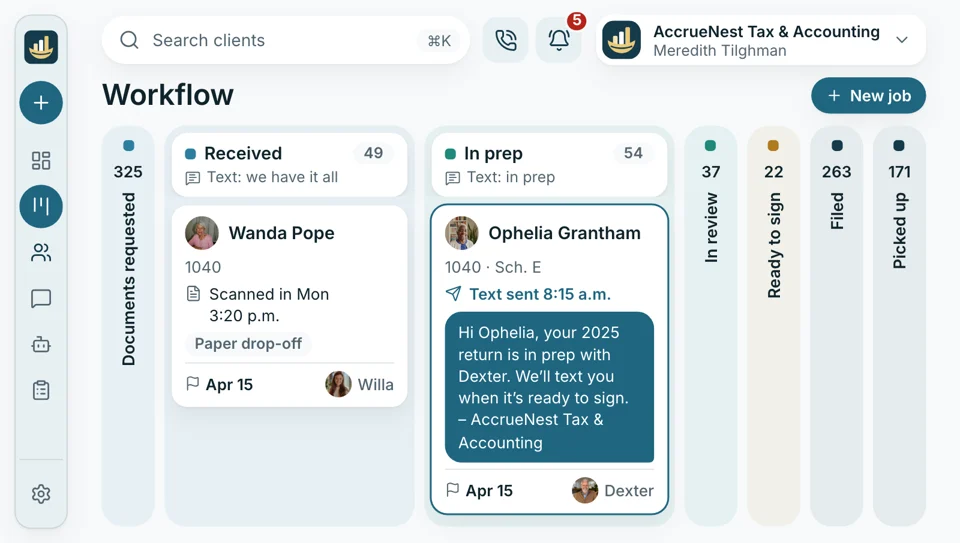
Each one used to mean walking back to a preparer mid-return. Now your staff move each return along the workflow board, each move texts the client where it stands, and fewer people call to ask.
- The stage sits on their record, so you answer without leaving the desk
- After hours, the AI reads callers that same stage too
“Where do I send this?”
Documents come by email, text and envelope
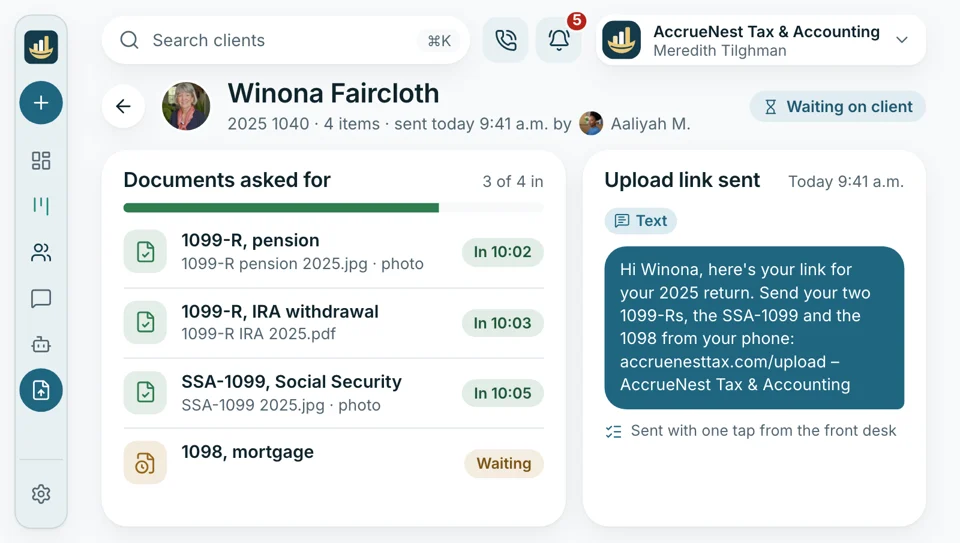
Then someone saves each one under the correct client. Now one tap sends the upload link, and every document lands on the client's record under its own name.
- Organizers open from the text with no sign-in needed
- Anything still missing on day three gets a reminder that names it, then weekly
Monday numbers
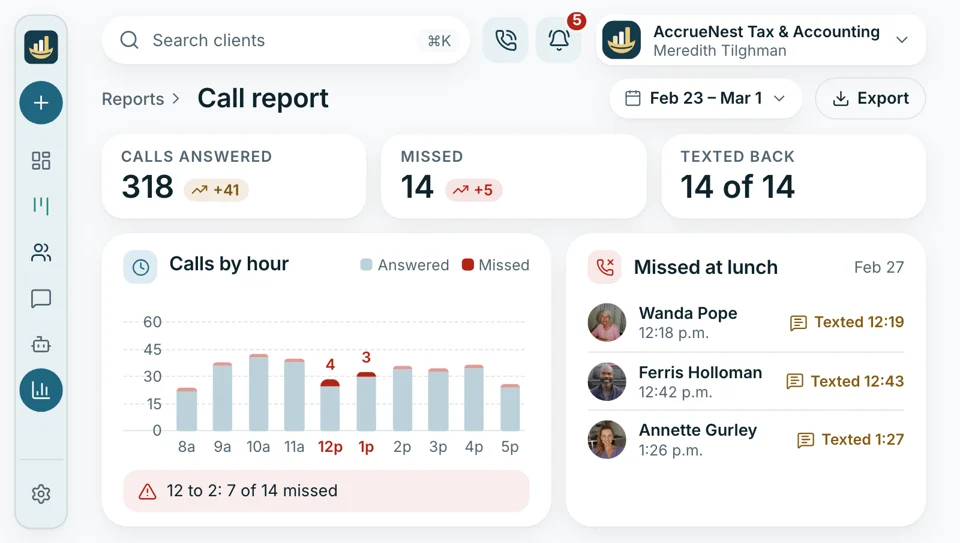
Which hours the phones went unanswered last week
The call report lists every missed call by hour and by who was on, which shows where February needs another person.
- Time to first reply shows how long each text waited for someone to answer
- Bookings counted per person, next to the calls each one answered that week


Also included
- A text to callers who hang up
- Staff app for phones
- Phone menu: press 2 for documents
- Spanish on calls
- Call recordings, announced where consent is needed
- Internal notes on threads
The other parts your firm gets
Calls and texts are one part of the account. On the same plan we design your website, manage the ads and send the review requests for you. Each plan includes everything. The monthly price follows the headcount that signs in, starting at $97 for one person.

Front Desk Calls, texts and drop-offs handled while the counter stays busy.
You're hereAlso on your plan
- Call and desk reports Which hours and which people miss calls.
- Online booking Drop-off, pick-up and meeting slots
- Texting Text with clients over the office line, using saved replies.
- Google reviews After a return goes out, consenting clients hear about a Google review.
- Local search pages Service pages and blog posts we write
- Ads Search and Facebook campaigns we build and watch; click charges go to your firm's card.
- New inquiries Prospects by stage, first call onward
Write down the questions you repeat
List the ten questions your front desk hears most in February. While we talk, they become answers, and you hear a sample call picked up under your firm's name. Any answer can change before it goes live.


Heard at the front desk

Cornelius B.Owner of a CPA firm, Columbus Line twocovered in FebruaryEvery February I'd grab line two myself between returns. These days the AI takes that call and I skim its notes over lunch.

Ezequiel M.Enrolled agent, San Antonio Saturdaysat my desk againSaturdays used to mean me answering the phone between drop-offs. Now my front desk works the counter, the AI answers the overflow, and I keep preparing.

Annika L.Bookkeeping firm owner, Minneapolis 1 tapto send the linkClients ask where to send statements every month. My assistant taps one saved reply with the upload link, and each statement arrives under the client's name.

Marguerite D.Office manager, New Orleans 1 minutefor a status callI see who's calling before I pick up: their last text, where their return sits on the board. Most calls take a minute now.

Prakash S.Tax preparer, Edison, NJ No knockswhile I'm in a returnNobody walks back to my desk to ask if a return is done. I move the card, and the client gets the text.

Thuy N.Client services lead, Houston, TX 8 a.m.summaries, not voicemailsI'd come in to forty voicemails each morning. Now it's a page of summaries and drop-offs already booked.


Desk questions
Questions from the desk
Type overflow, after hours, status or Spanish to find the answer faster.
6 questions
Who answers when I'm on another call?
Your AI receptionist, once every line in the ring group is taken. Its greeting says the caller reached an AI helper for your firm; it answers from your replies, books and transfers urgent calls.
Can the AI answer tax questions?
No. It gives no tax advice and never says what someone owes, what they may deduct or whether a return is ready to file. It records the details and leaves the answer to your staff.
Can the AI say a return is done?
Only from the stage your staff set on the workflow board, and only to a caller ringing from the number on that client's record. Nothing comes from your tax software or the IRS.
Does a caller's file pop up?
Yes. Their name comes up and their record opens with every past call, text, form, return stage and payment. Your tax software keeps the return; none of it is pulled from there.
Can I send a “documents received” text myself?
Yes. Pick the saved reply, change a word if you like, and tap send; it goes out on the office number. Moving a card to Received on the workflow board can send it too.
Does the AI take my job?
No. Your firm's people answer first; the AI takes the calls nobody is free for, after hours and in overflow, and hands back to you.
Common desk searches
Ask about February
Email Imogen at sales@accruenest.com with your phone lines, your hours and the questions your front desk hears most.
Imogen PritchardAccount manager
Request a demo