

Tax organizers and requests for accounting firms
Organizers that come back
with every documentOrganizers back with every document
AccrueNest is tax organizer software for US accounting firms of 1 to 10 people: each organizer is a phone form, not a PDF, with its own upload slot for every W-2, 1099 and K-1, and a text names whatever is still missing.
- Questions shaped by the client's earlier answers
- No password to open

Live in 14 daysMonth to month, no setup fee
- Organizer link sent by text
- Reminders until it's complete
- Photos from the phone camera
- Day 3, day 7, weekly
- Individual, business and new-client organizers
- No SSN fields
Each client gets the organizer for their return type: individual, business or new client. Questions appear from earlier answers, every document has its own slot, and the reminders repeat until the final item arrives.
Documents in pieces, by email
Every item has a slot
The organizer, finished on the couch after dinner


Request types
One form for each kind of request
Each one opens from a link, no sign-in needed.


During setup your organizers become forms: one for individual returns, one for business returns and one for new clients. Follow-up questions show up only if an earlier answer needs them: a renter never sees the mortgage interest page, and a salaried client skips Schedule C.
On the 1st, bookkeeping clients receive a request by text for last month's bank statements, card statements and receipts. Each account has its own slot, and the reminders repeat until the month's set is in. Your bookkeeper opens the client's record and finds every file by name.
A K-1 turns up in late March, after the rest of the return is ready. Send a one-item request, and the client uploads it from that text.
Behind the organizer
Every document lands on the client's own record
On your website
New clients start the form online
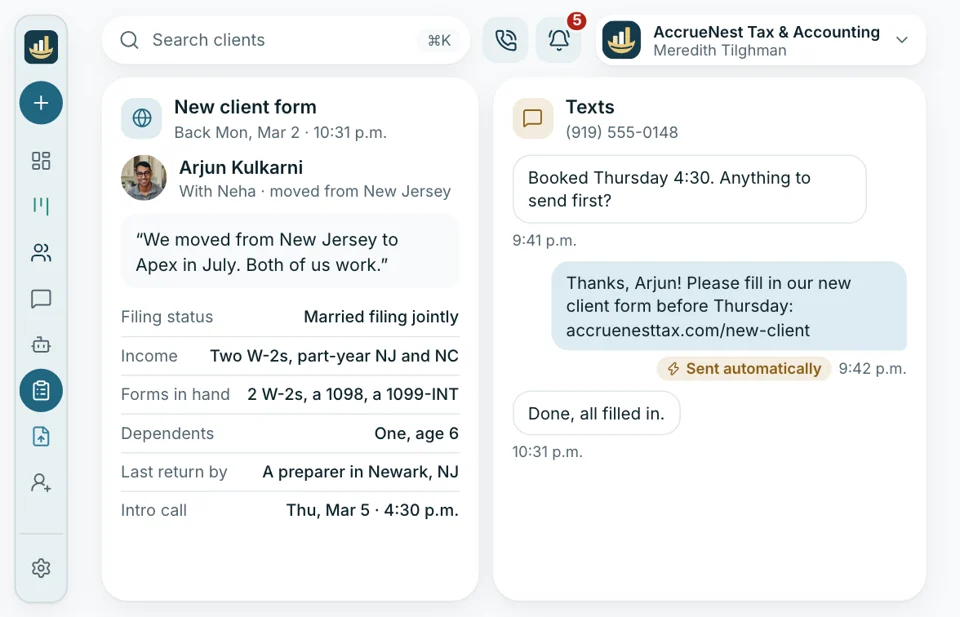
A couple hunting for a new preparer after a move finds your site, books an intro call and receives the new-client form that same evening. By the time you meet, you know their filing status, where their income comes from and which forms they already hold.
- The new-client form sits behind the booking button, with a slot for last year's return
- You walk into the intro call with their answers already read
Privacy
Forms that ask only what's needed
What clients upload or tell your firm is encrypted, used only to serve your firm and not sold to anyone. No organizer question asks for an SSN or bank account numbers; cards go only through the payment page. Each staff member gets a role, and a log shows who changed what.
- Staff logins ask for a second step on the phone too
- Roles decide which people on your team can open a client's documents and records

Still missing
A text that names it
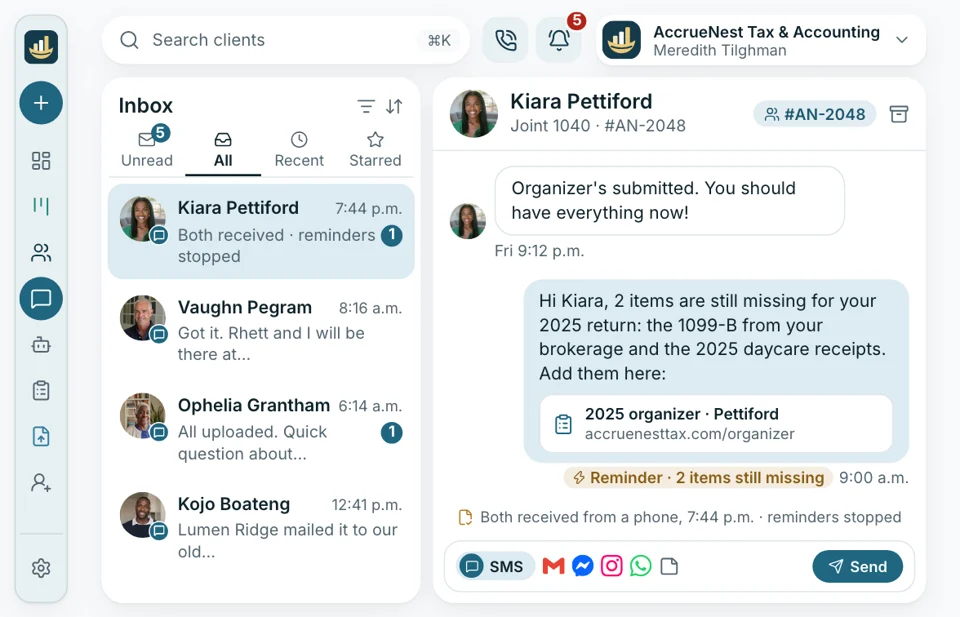
March 3, and the couple who wrote “you should have everything now” still owe two items. The reminder names them, the brokerage statement and the daycare receipts, with the link back to the form. Both arrive from a phone that evening. Staff or the form mark each item received, and the reminders end after both are in.
- No text consent? The reminder goes by email
- Your firm sets the wording and the schedule of every reminder
Monthly bookkeeping
Receipts by the 10th
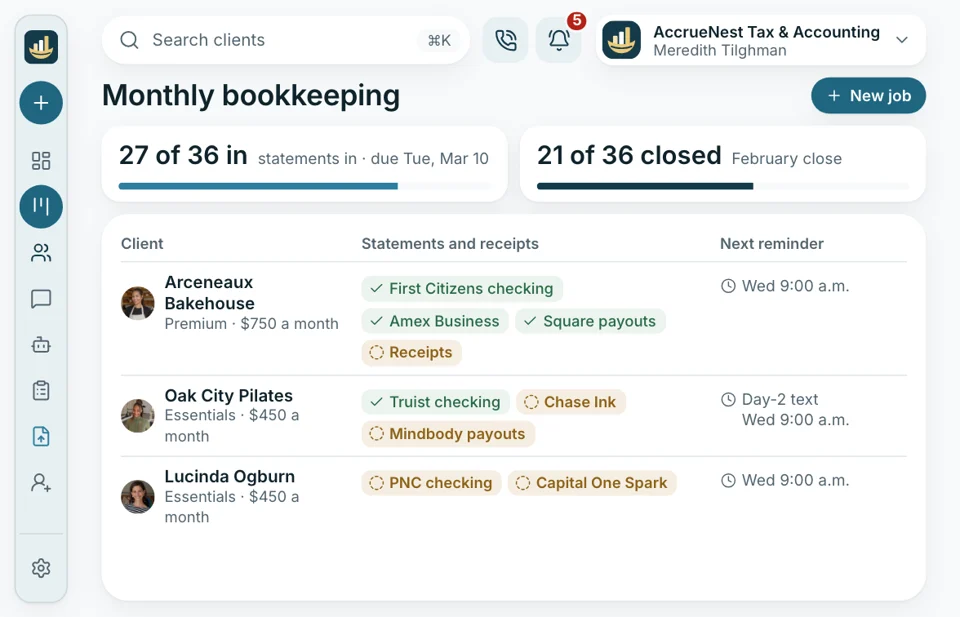
Bookkeeping clients owe last month's statements and receipts by the 10th. On the 1st, each one gets a request with a slot for every account you keep for them, and reminders follow until the set is complete. Your bookkeeper starts the month with every file named.
- Each bank and card account gets its own slot
- A stack of receipts goes in as phone photos


Comes with
- PDF, Word, Excel and photos
- Text consent boxes
- Branching questions
- Organizers rebuilt from yours
- A form for new clients
- Two-step sign-in for staff
Every file, on the record it belongs to
When Winona sends back the organizer, the record holds the answers, each document under its name, the reminders sent and the items not yet in. Your preparer opens it from the Workflow board, or from the screen when Winona calls.

2025 retirement organizer Sent January 15, back Sunday night, 1099-R and SSA-1099 attached, one item missing.
OrganizerOrganizers connect to
- Reports Organizers out and back, and documents still missing, across every client, week by week.
- Phones Calls about documents open the caller's record and what's missing.
- Search and Maps People searching for a tax preparer nearby find your firm on Google and Maps, with the new-client form one tap away.
- Website Built and written by us, with the new-client form behind its booking button.
- Ads In January, Google and Facebook campaigns bring new clients in, and each one who books gets the new-client organizer before the intro call.
- Texts Organizer links and reminders carry your firm's name, and every reply reaches your staff.
- Reviews After a return is delivered, consenting clients receive one short request to review your firm on Google.
Bring last year's organizer
Bring last year's organizer and the list you send bookkeeping clients each month. In the demo, watch each one work as a phone form, and hear what your headcount would pay.


Complete files, by mid-February

Cornelius B.Owner of a CPA firm, Columbus By Februarymost files completeOrganizers used to come back in pieces through April. This year most files were complete before we opened a single return, and nobody sent a third email.

Ezequiel M.Enrolled agent, San Antonio Same daymost organizers returnedHalf my clients never opened the PDF organizer. They answer the text version on their phone, photos included, usually the day it arrives.

Annika L.Owner, bookkeeping firm, Minneapolis 10thmonthly files dueStatements used to trickle in until the 20th. The monthly request names each account, and most clients finish it by the 10th.

Marguerite D.Office manager, New Orleans Gonethe missing-documents sheetMy spreadsheet of missing documents is gone. The reminder texts name each one for me.

Prakash S.Tax preparer, Edison, New Jersey One recordfor every client's documentsWhen I open a return, the W-2, the 1099s and the K-1 sit on the record under their own names.

Thuy N.Client services lead, Houston, TX One sittingfor most organizersClients who said the organizer confused them now finish it in one sitting. The questions skip what doesn't apply.


Organizer questions
What firms ask first
Try a word like reminders, photos or business returns.
6 questions
What is a tax organizer?
A tax organizer is the set of questions and the list of documents a client answers before a return is prepared. Ours is a phone form, not a PDF.
Will we need to write our organizers from scratch?
No. Send us the organizers you use now, and our team rebuilds them as forms during setup, at no extra charge. You okay each one.
Can an organizer skip what a client doesn't need?
Yes. Each organizer branches on the client's answers. A yes to selling a home opens the questions and the upload slot for the closing statement; a no skips them. A side business opens its own income and expense questions. Clients see only what applies to them, so the form stays short.
Does a client have to sign in to answer it?
No. The organizer or request opens straight from the message it came in, with no password. Clients who want their files later can sign in to your firm's portal.
How do reminders work, and when is it done?
Texts and emails nudge the client on the third and seventh days, then weekly. Each item is marked in as it arrives, and nothing more is sent once the last one lands.
Does the return still get done in Drake or Lacerte?
Yes. AccrueNest sits beside your tax software and your books. Form 8879 is signed in your tax software, as it is today.
Quick searches
Ask about your organizers
Email Imogen at sales@accruenest.com about rebuilding your organizers, monthly requests for bookkeeping clients or how reminders are worded.
Imogen PritchardAccount manager
Request a demo