

Invoices, deposits and autopay for your firm
Invoices paid
while the work is freshPaid while the work is fresh
AccrueNest is accounting firm billing software, sized for a US firm of 1 to 10 people. Each deposit and balance reaches the client as a text holding a pay button, monthly fees are charged to a card kept on file, and every payment taken here is recorded in QuickBooks Online.
- Deposit invoices at signing
- Past-due notices by text, then email

Live in 14 daysMonth to month, no setup fee
- Card payments on every invoice
- Any invoice paid by ACH transfer
- Recurring invoices for monthly bookkeeping clients
- Due-date notices, early and late
- Fees split into set payments
The deposit invoice opens the minute an engagement letter gets its signature. Monthly bookkeeping clients carry a saved card that covers a recurring invoice on the 1st. When a return is done, the balance travels as a text holding a pay button, and reminders follow on your schedule.
Paid in June, or never
Deposits, autopay, pay links
Who it's from, what's due, one button.


Inside the Billing screen
Who has paid and who still owes
What the office manager checks before nine.


Each invoice is marked draft, sent, paid or overdue, next to the client and the service it covers. Open one to resend the pay link by text or to see which reminders already went out.
Each bookkeeping or payroll client gets a recurring invoice with their monthly fee. It goes out on the date you choose and charges the card on file, so nobody sits at a desk on billing day.
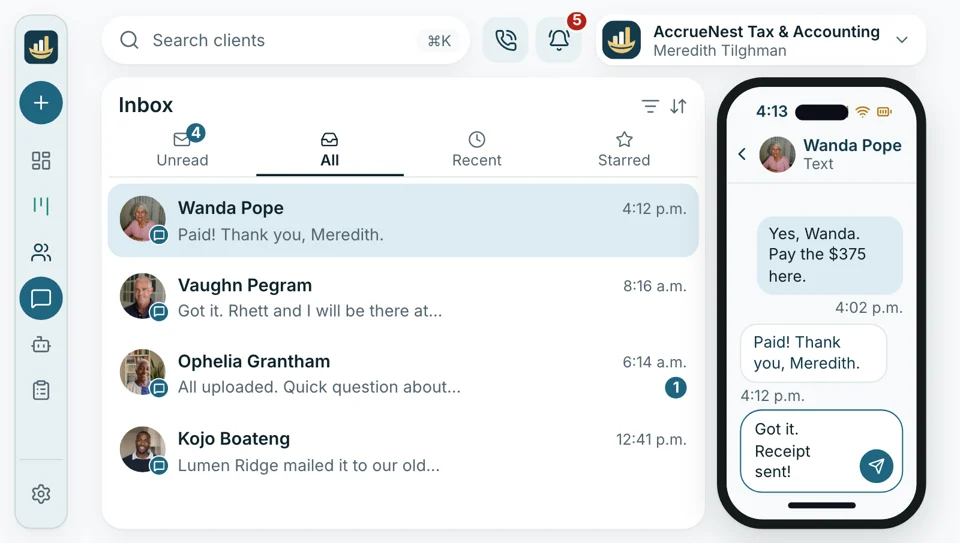
A client texts at lunch asking about the balance. The front desk replies in that same thread, attaching a link for exactly that amount, no second program open. Once paid, the invoice updates and QuickBooks Online gets the receipt.
Payments across your whole firm
A paid invoice, counted everywhere else
A payment does more than close an invoice. It sits with the client's calls and texts, it counts toward the campaign or referral behind them, and the owner can check it from a phone.
Into your bank
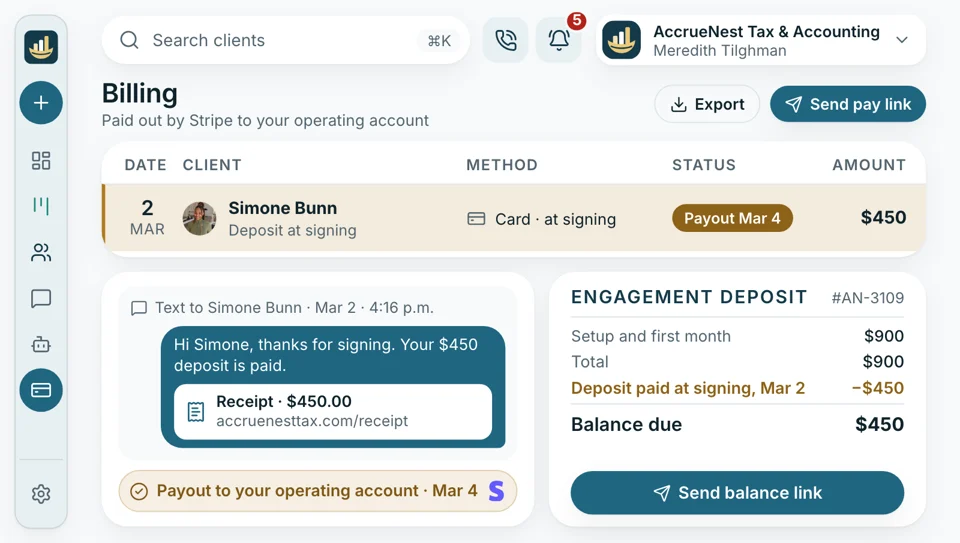
Payouts to your operating account
Payments run through Stripe into your firm's own operating account, on Stripe's payout schedule, so the money never sits with us. Your plan's price depends on logins, never on the amount you collect.
- No cut of your fees on anything you bill.
- The flat price stays the same in April and August alike.
On the phone
Balances on screen during calls
April, and a client rings about the balance. Their record opens on screen with past calls, texts and invoices, so the answer takes one breath. The payment that follows lands on that record, and on the invoice in QuickBooks Online.
- An open balance shows on screen before the first hello.
- Mid-call, a pay link reaches their phone by text too.

Ads
Which ads paid for themselves
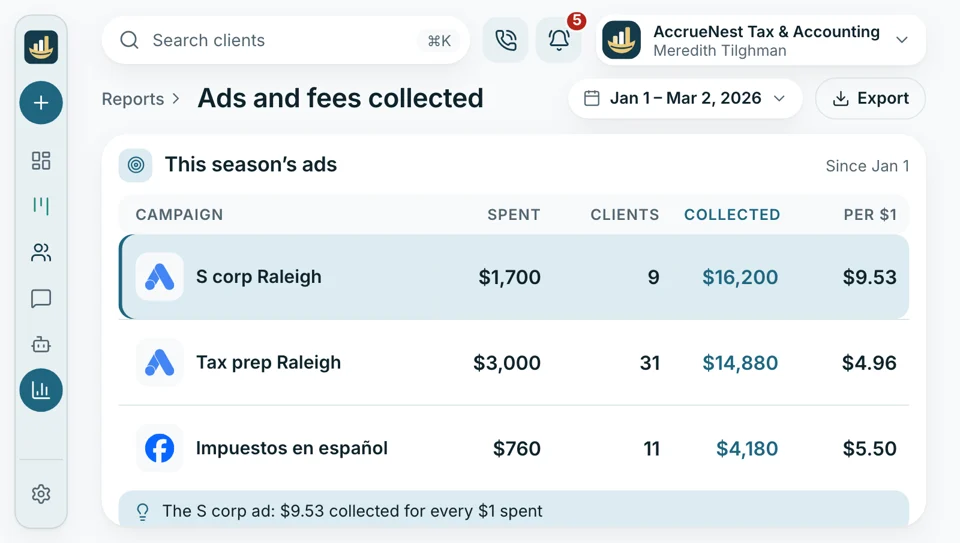
Each new client's record keeps the ad, search or referral that sent them, and their payments sit on that record too. The dashboard sets ad spend beside new clients and fees collected, so the owner sees what a season of Google ads brought in.
- Click charges go from Google and Meta straight to your firm, through accounts your firm opened and owns.
- The flat fee already covers our time creating and managing every campaign.
Staff app
Payments seen from your phone
The owner and staff carry the AccrueNest app on their own iPhones and Android phones. A client's question about a bill can be answered from a parking lot, link included, and the record shows it paid before you're back at the desk.
- Anyone on staff can send the balance from the app by text.
- Open invoices show on each client's record too.
Reminders
Overdue texts in your words
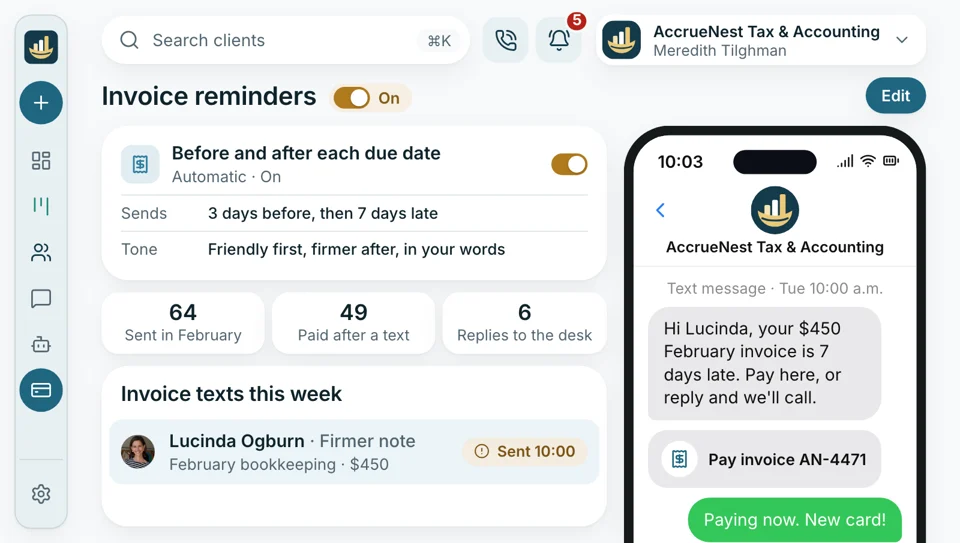
We write the reminder texts and emails with you at setup, in your firm's tone: a friendly note three days early, and a firmer one seven days late. Your firm's name signs every one, and any answer lands with the front desk.
- A payment cancels every reminder still waiting, with nobody marking it off by hand.
- Only clients who opted in to your firm's texts receive them.
After payment
Reviews
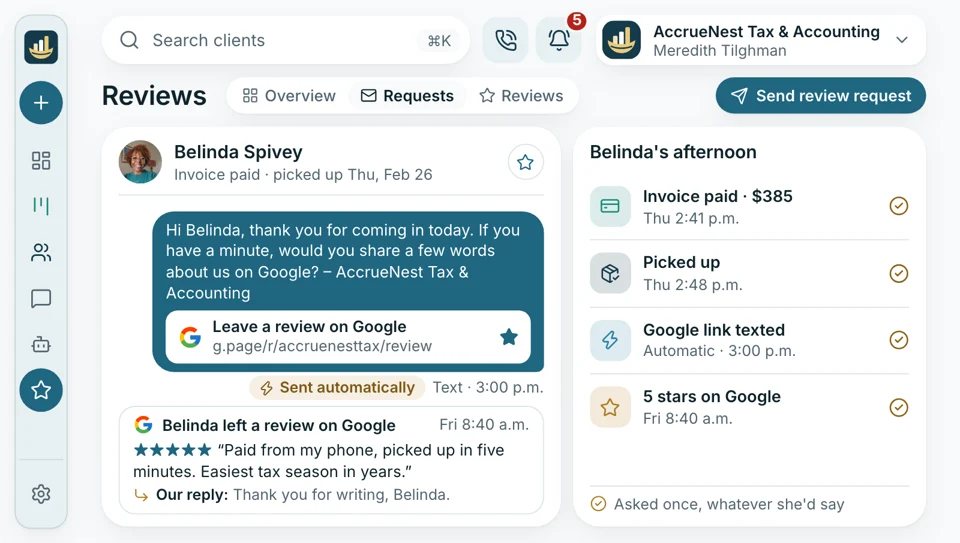
When a return goes out or the year's books are closed, each client who gave consent receives a short text linking to your Google reviews, whether they loved the work or not.
- Replies we post say nothing about returns, balances or who hired you.
- Requests skip anyone who hasn't given consent yet.


Included too
- Deposit invoices at letter signing
- Pay links
- Saved card autopay
- Bank payment on invoices
- Overdue reminder schedules
- Payments recorded in QuickBooks
Payments on every client's record
Each invoice and payment sits with the client's calls, texts, letters and documents, so whoever opens the record sees what was billed, what was paid and what is still open.

The 1120-S balance, paid Paid from the link texted with the return, recorded in QuickBooks.
Paid todaySeen across AccrueNest
- Calls An open balance is on screen when that client calls in.
- Website Your new site sends each inquiry to the board where its proposal and deposit follow.
- Search and maps Service pages and your Google profile bring the searches that become paying clients.
- Google and Facebook Your firm holds the ad accounts. The dashboard puts each season's spend next to who signed and what they paid.
- Texts Balance texts and due-date notices carry your firm's name, and answers reach your team's inbox.
- Paid consultations Tax resolution and advisory consultations can take a card when they're booked.
- Google reviews Once the year's books are closed, consenting clients get a text linking to your reviews.
Show us how your firm bills clients today
Bring a recent invoice and your fee list. In the demo we build a deposit, a monthly autopay invoice and a pay link using your own numbers, then open the screen a client pays on.


Paid before we asked

Cornelius B.Owner of a CPA firm, Columbus Zerocollection emailsOur business returns now start with a deposit, and the balance goes by text when we finish. I don't write collection emails anymore.

Ezequiel M.Enrolled agent, San Antonio Gonethe counter's owed listClients pay from the text before they're home from picking up their copies. The counter used to track who still owed on paper.

Annika L.Owner, bookkeeping firm, Minneapolis Monthlyfees, no askingEvery monthly client is on autopay with a saved card. When a card expires, the reminder goes out before I even notice the invoice is late.

Marguerite D.Office manager, New Orleans Minutesto match paymentsI see who has paid and who hasn't before my coffee. Payments are already in QuickBooks, so month-end matching takes me minutes.

Prakash S.Tax preparer, tax office, Edison Overnightfor most balancesI used to finish a return and wait weeks for the check. Now the pay link goes out that day, and most clients pay that night.

Thuy N.Client services lead, Houston tax office One threadquestion, answer and paymentWhen a client texts about their bill, I answer in the same thread with a pay link, and it's usually paid within the hour.


Billing questions
Cards, banks, autopay and your QuickBooks
Autopay, ACH, receipt: start with one of those.
6 questions
How can our clients pay us?
By card or from a bank account, on the invoice's pay page or through a link sent by text. The client portal also lists every invoice with its pay page. Bigger fees can become a payment plan of fixed amounts.
Does it do recurring invoices and autopay for monthly clients?
Yes, recurring invoices go out monthly. Monthly clients can be set on autopay with a saved card, and any single invoice can be paid straight from a bank account.
Do deposits come before the work?
Yes. A deposit invoice can go out the moment an engagement letter gets signed, or when a paid consultation is booked. Signing takes the client straight to the payment screen, so the deposit is in before anyone opens a return or a bank statement. The rest of the fee can follow as one invoice when the work is done, a recurring monthly charge, or a payment plan split into set amounts on a saved card.
Where do payments get recorded?
In QuickBooks Online. Payments taken through AccrueNest appear in QuickBooks as sales receipts, and invoices we send appear there too, so your books pick up the fees without retyping. Nothing flows back from QuickBooks, and the books themselves stay in your QuickBooks Online file, or in Xero.
Are there any extra fees?
Not from us. One flat fee each month. We never charge by the call, the inquiry, the client or the return, and we take no cut of what you bill. Payments run through your firm's own Stripe account, under Stripe's standard terms.
Who builds our invoices?
We do. During setup our team builds your invoice and deposit templates, your recurring invoices for monthly clients and your reminder schedule, then connects Stripe and QuickBooks Online. Month to month, no setup fee, live in 14 days.
Searched most often
Questions about your fees?
Write to Imogen at sales@accruenest.com with a recent invoice and questions on autopay.
Imogen PritchardAccount manager
Request a demo