

For firms running a second office
Two offices,
run as one firmTwo offices, one firm
AccrueNest is multi-office accounting firm software for US firms of 1 to 10 people. Offices keep separate numbers, calendars and staff, calls route by office, and the owner works from one inbox and one report across them.
- Press 1 for North Hills, 2 for Garner
- One inbox for both
- Each office's numbers, side by side


Live in 14 daysMonth to month, no setup fee
- User roles for each office
- Office calendars
- Routing by office
- Reviews per office
- Shared inbox
- Recorded with notice
Second office
Two offices, two inboxes and no report
The Garner office opened two years after North Hills. It has its own phone line, a Gmail inbox the front desk checks between appointments and a paper sign-up sheet for drop-offs. A North Hills client calls about a return sitting in Garner, and the front desk texts a preparer's cell to ask. In April the owner still can't say which office the year's new clients came through. With AccrueNest, North Hills and Garner keep separate numbers and calendars, and the owner reads one inbox and one report.

- Two inboxes
- Guesswork
- Paper drop-off sheets
- Each office's calendar
- One shared inbox
- Reports by office
Office by office
Two front desks, one account behind them
North Hills and Garner each get a phone number, a booking calendar, their own staff and a page on your site. Calls, texts and reports still sit in your firm's one account.
AccrueNest · Calendar

The client's booking page

Clients pick the office first
Clients pick an office before they pick a preparer or a time. Drop-off slots in Garner and sit-down appointments in North Hills run on separate calendars and hours.
See consultation bookingAccrueNest · Calls

The Garner front desk

Garner calls stay in Garner
North Hills and Garner each answer on their own ported number. Someone dialing the main line hears press 1 for North Hills, 2 for Garner, and lands at that front desk.
See phonesAccrueNest · Reviews

The text the client gets

Reviews land per office
A client who dropped off in Garner and gave consent gets a review text for the Garner Google listing, not the North Hills one.
See reviewsAccrueNest · Prospects

The office manager's app

Office boards
Each office can have its own board of prospects, New inquiry through Engaged, with its own follow-up texts. From the same account the owner flips between the Garner and North Hills boards.
See pipelineAccrueNest · Billing

A client's invoice text

One Stripe account
Invoices from North Hills and Garner carry the firm's name, and payments go to one Stripe account. AccrueNest records the payments and invoices it collects in QuickBooks Online.
AccrueNest · Reports

The owner's email

Office totals
Every month the owner sees North Hills and Garner side by side: calls in, appointments booked, clients engaged, with the firm's total underneath.
ReportingAccrueNest · Inbox

A client's text

One inbox
Texts to either office land in one inbox, marked with the number they reached.
See messagingApril, across both front desks
Three moments from one April Tuesday, each landing at the office it belongs to.
Right now· North Hills 4 calls, Garner 3
9:12· Main line
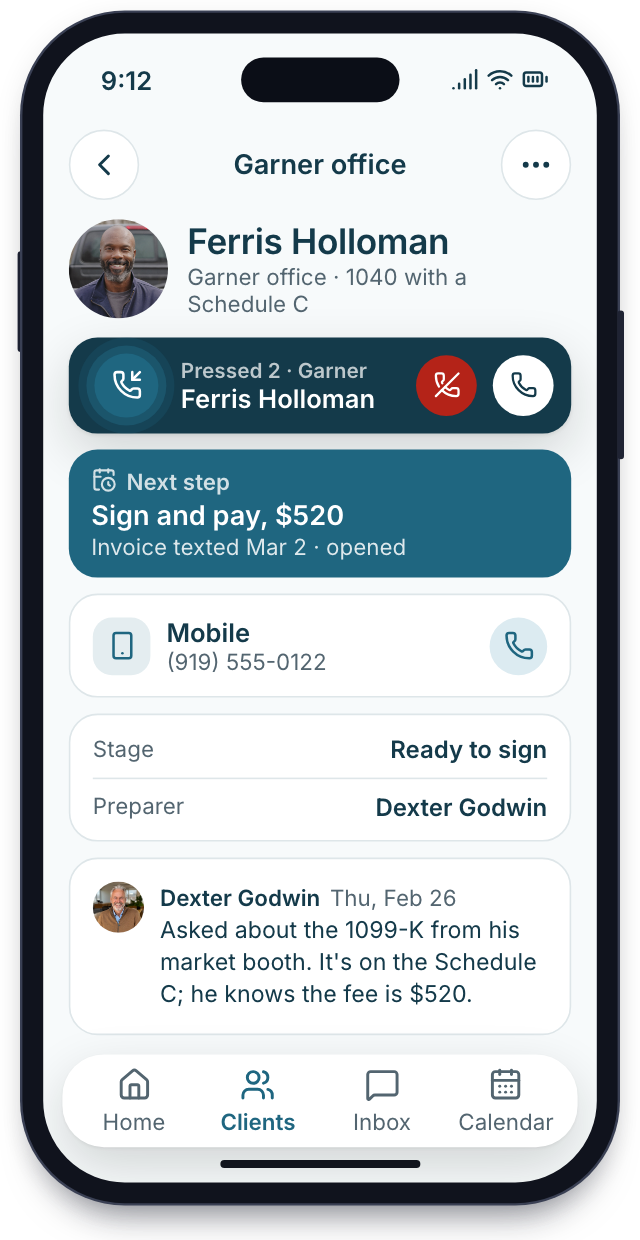
Press 2, Garner
A client calls the main number and presses 2. The Garner front desk picks up with the client's card already open, stage and past calls included.
11:40· Text to Garner

Answered from either office
A client texts Garner's number while that desk is at lunch. The thread pops up in North Hills too, and someone there answers it.
4:30· Pick-up done
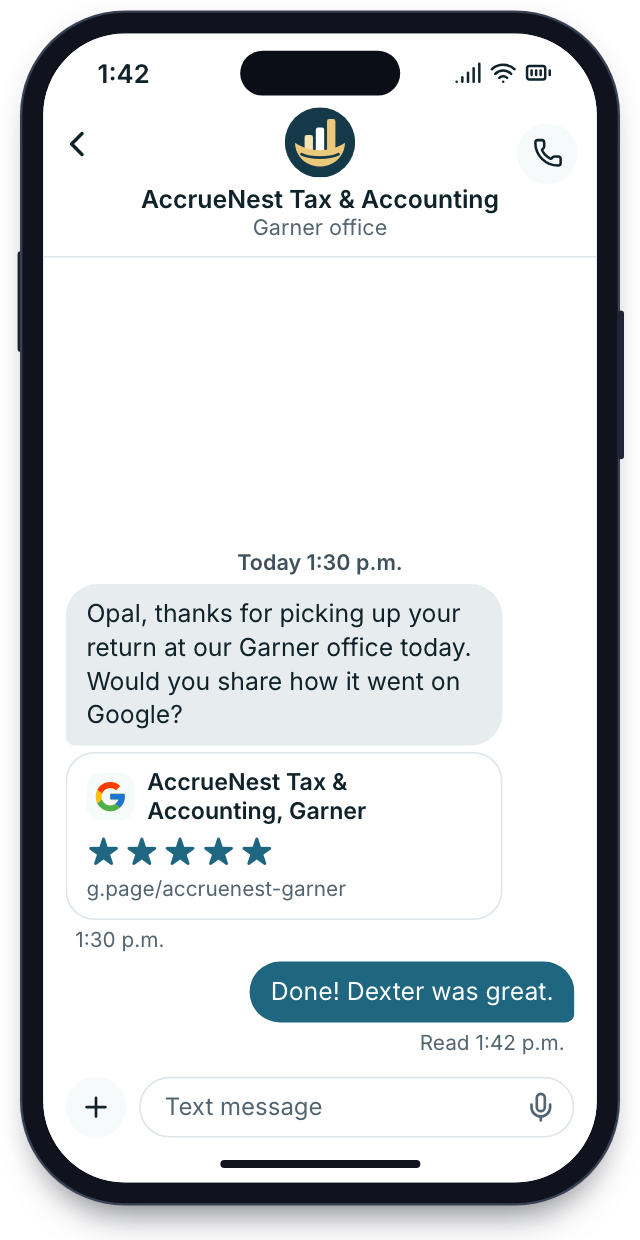
Garner reviews
A Garner client picks up their return. Staff move the card to Picked up, and because the client gave consent, a text links them to the Garner Google listing.


Setup
Both offices set up by our people
Your account manager maps each office first, then our team builds the numbers, calendars and pages for both.
We map offices
Your account manager lists each office's address, hours, staff, phone numbers and the services it offers.
Call onewho works where, and when
We build both
We port each number, write the phone menu, set a calendar per office and preparer, and add an office page to your site.
Buildphone menu, calendars, office pages
Each desk trained separately
Your client list is brought over, your organizers and engagement letters are rebuilt and your people are trained, all at no extra charge. Each front desk learns its own calendar and the shared inbox.
TrainingNorth Hills first, Garner the next day
Both offices go live
The booking page offers both offices, the office pages are live, and next month's report already splits every number by office.
Day 14both offices take bookings
Month to month, no setup fee
Office setup
Both offices booking online
8 of 28 done
1We map officesDoneIn progressUp next
- Street address and opening hours, per office
- Staff listed under North Hills or Garner
- Phone numbers for North Hills and Garner gathered
- What each location handles: drop-offs, planning, bookkeeping
- Drop-off windows per office
- Who sees which office's calendar, decided
2We build bothDoneIn progressUp next
- Ports started for both numbers
- Main-line greeting recorded with both choices
- Every preparer's working hours set up
- North Hills and Garner both bookable online
- Ring groups set
- Shared inbox connected
- Office pages written with address, hours and staff
- Garner and North Hills review texts kept apart
3Each desk trained separatelyDoneIn progressUp next
- Client list imported, each client tagged with an office
- North Hills schedules a mock drop-off
- Garner desk hands a test call to North Hills
- Roles set
- Owner shown the office reports and the shared inbox on the app
- Test call through the phone menu
- Two-step sign-in for each person
4Both offices go liveDoneIn progressUp next
- Office pages published, both Google profiles updated with the new links
- Booking page live
- Menu tested from outside
- First monthly report split by office, with the firm's total
- Imogen's first review call booked
- Inbox live
- All set
Priced by people, not offices
A second or third office adds nothing to the bill. The price climbs only with logins, never with addresses, and begins at $97 for one person. Month to month, no setup fee, live in 14 days.


Heard across offices

Cornelius B.Owner of a CPA firm, Columbus Two officesSide by sideDublin became our second location in March. Calls reach the right desk now, and the monthly report puts both offices' new clients next to each other.

Ezequiel M.Enrolled agent, San Antonio Press 2Across townOur second tax office is across town. Clients press 2 for it, and the drop-off calendars no longer collide.

Annika L.Owner of a bookkeeping firm ZeroThreads on personal phonesMy two bookkeepers in St. Paul used to keep client texts on their own phones. Now every thread is in the firm's inbox where I can read it.

Marguerite D.Office manager, New Orleans Both officesFrom one deskI run the front desk for both offices from one screen. Each call shows which office the client belongs to.

Prakash S.Tax preparer at a tax office, Edison Two calendarsOne preparer, both officesI work Tuesdays in one office and Thursdays in the other. My drop-off slots follow me, so clients book the right door.

Thuy N.Client services lead, Houston Katy listingIts own reviewsKaty clients get Katy's Google review link now, and that listing finally has reviews.


Office questions
More than one office
Search menu, listing or price to cut this list down to a few questions.
8 questions
Can North Hills and Garner keep separate phone numbers?
Yes. North Hills answers on a North Hills number and Garner on a Garner number, each with separate calendars and hours, and the main line lets callers choose.
Can I see every office together?
Yes. The report gives the North Hills numbers, the Garner numbers and the firm's total in one table.
Will Garner get its own Google profile?
Yes. Every office with a street address of its own keeps a separate Google Business Profile, and our team looks after each one. Your site gets an office page per location listing hours and the staff who work there, and review requests send clients to the listing of the office they visited.
How is it priced?
Each plan includes everything. The monthly price follows the headcount that signs in, starting at $97 for one person.
Can offices share one inbox?
Yes. Texts, emails and chats sent to either office arrive in a single inbox, each thread marked with the office number it reached.
Does our tax software stay?
Yes. AccrueNest sits beside your tax software and your books. Returns are still prepared and filed there, at both offices.
Is client information kept safe?
What clients upload or tell your firm is encrypted, used only to serve your firm and not sold to anyone.
Will a new location lock us into a term?
No. Nothing to sign for a set term, and no yearly bill to finish paying if your firm walks away.
Common office searches
Ask Imogen
Email sales@accruenest.com with your offices, their hours and who works where, and Imogen will sketch how calls should route.
Imogen PritchardAccount manager
Request a demo