

E-signed letters and proposals for your firm
Letters signed
before the work startsSigned before the work starts
AccrueNest is engagement letter software for accountants at US firms of 1 to 10 people. The proposal shows your packages and fees, the letter fills in from it, and the client signs on a phone, then settles the deposit one screen later.
- Unsigned letters followed up by text and email
- Next year's letter, scheduled

Live in 14 daysMonth to month, no setup fee
- Sent by text or email
- Letters renewed each year
- Signed on any phone
- Reminders until it's signed
- Organizer sent once they sign
- Deposit due at signing
We build one proposal for each service you sell, such as an individual return, monthly bookkeeping or advisory, with your packages and fees. Your engagement letter takes the client's name, services and fee from their card, and the deposit invoice opens once they sign.
Started on a handshake
The letter comes first
No printer, no scanner, no envelope back to the office.


Inside AccrueNest
Set up once, ready every tax season
We build the proposals and load your letters at setup.


Each proposal lays out up to three packages side by side, listing the services in each and the fee. The client gets it by text or email, sent under your firm's name; their card on the board moves to Proposal sent.
Your engagement letters go in as your firm wrote them, one for each service: individual returns, business returns, monthly bookkeeping, advisory. Names, services and fees fill in from the client's record. Once signed, the PDF is filed to that record, and the client keeps a copy in their portal.
The card moves to Engaged, the first or recurring invoice starts, the organizer goes out, and a Workflow card opens for the preparer who takes the return.
Around the letter
Before and after the client signs
On your website
Your packages on your own site
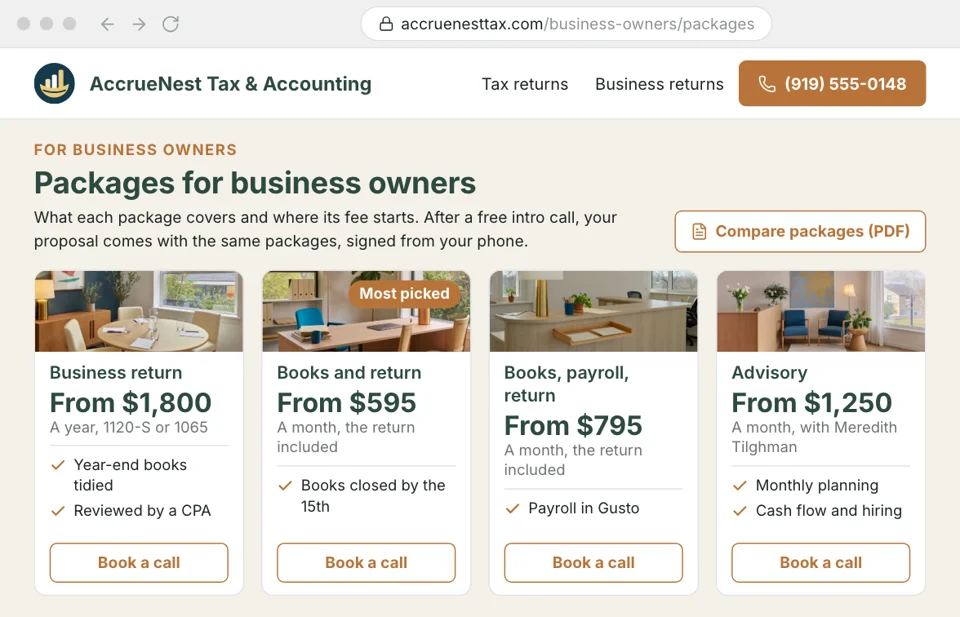
Our team writes your firm's website, and each service page says what your packages cover and, if you publish fees, where they start. A visitor books an intro call from that page; after the meeting, the matching proposal is sent from their card with the same packages.
- Published fees match proposals so nobody is surprised by the number on the letter.
- Intro calls book from the page for that exact service type.
Records
Signed copies on every record
Each signed letter is kept as a PDF with the client's other records and in their portal, so nobody digs through email for a signature. What clients upload or tell your firm is encrypted, used only to serve your firm and not sold to anyone. A signed copy is one tap away when a client disputes the fee.
- Card details go through the payment page, never a form.
- Staff sign in with two steps, and user roles limit who opens records.

Unsigned letters
Reminders until the signature lands
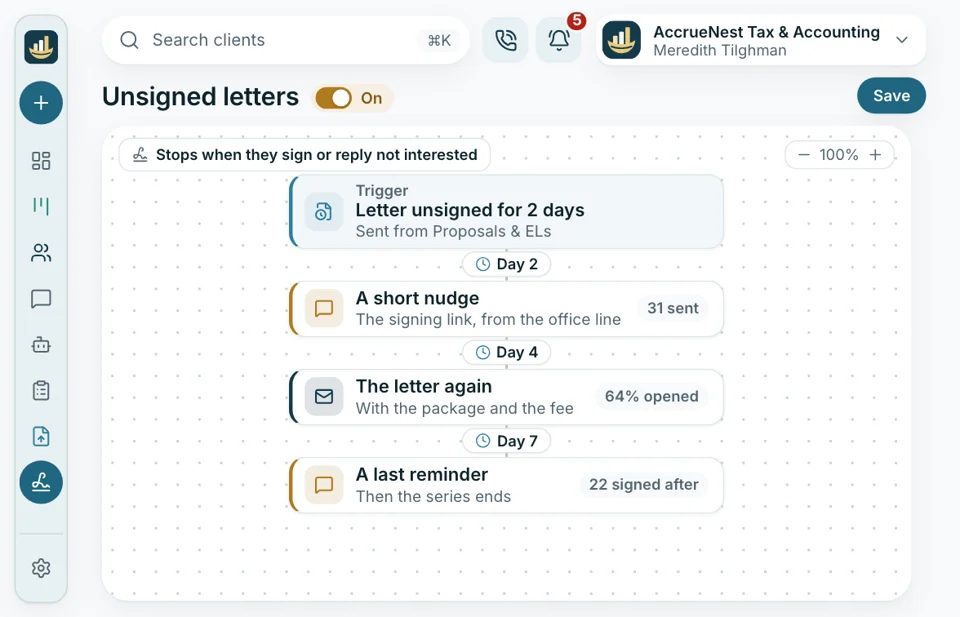
A letter left unsigned for two days brings a text, then an email, then another text, spaced the way your firm wants. The office keeps no list of who still owes a signature, and the series ends when the client signs or replies that they are not interested.
- A signature ends every reminder still queued
- When a client writes back, it shows up with the front desk to answer.
Office view
Who has signed, who hasn't
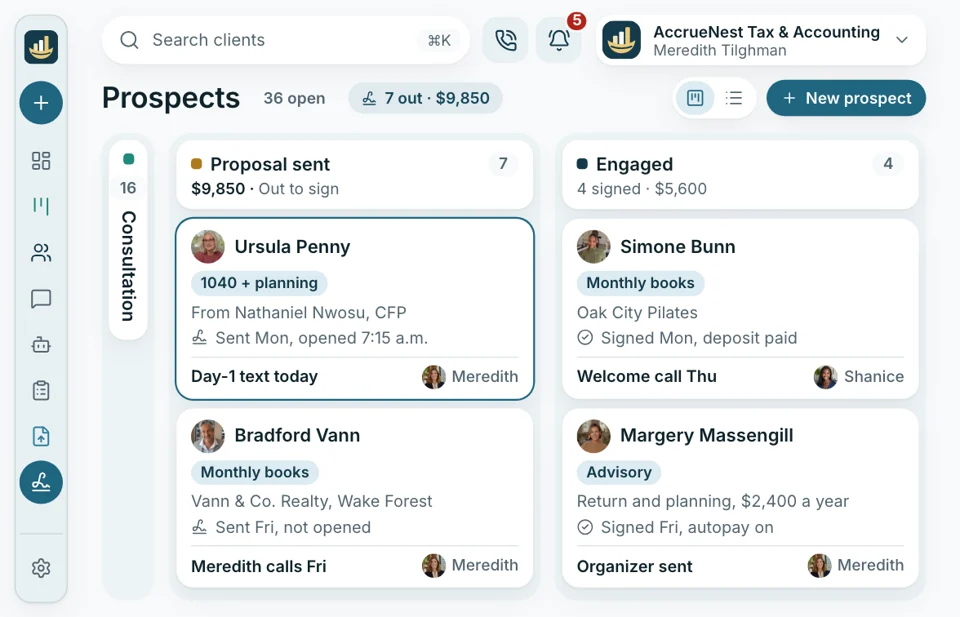
Every new client sits on the pipeline board by stage. In seconds, the office manager knows who has a proposal out and who has signed, and reports add it up for the owner: proposals sent, proposals signed and the fees they hold.
- Every card carries its stage and what the proposal is worth.
- Signed proposals are totaled by month and season too.


Also included
- Packages laid out side by side
- Your own wording
- Phone e-signatures
- Deposit invoice at signing
- Split payment schedules
- Next year's letter on schedule
Each letter, on the client's own record
Once signed, the letter joins the calls, texts, forms and payments already on that client's record. Every part of AccrueNest below works from that record, so a new client is typed in once.

Monthly bookkeeping, 2026 Engagement letter signed from a phone Monday night, deposit in.
SignedIt feeds into
- Reports Proposals sent and signed each month, their total value, and which source brought each client.
- Calls Every call with the client sits on the same card.
- Local Google searches Service pages written for searches like tax preparer near me or bookkeeping for contractors bring in the first call.
- Website Each service page shows your packages and books the intro call.
- Ads Your firm opened its own Google and Meta logins for this. Each consenting new client who signs a letter shows the ads which searches turn into work.
- Texts Signing reminders and the welcome message are sent under your firm's local number.
- Reviews After delivery of a return, clients who consented get one short text pointing to your Google listing.
Bring us last year's letter
In the demo we rebuild it as a proposal with your packages and fees, then show the letter a client signs from a phone and the deposit screen that comes next, each under your firm's name.


Signed before we started

Cornelius B.Owner of a CPA firm, Columbus By Januarysigned and paidBusiness clients used to sign in March, after the work had started. This January the letters went out by text and the deposits came with them.

Ezequiel M.Enrolled agent, San Antonio Same dayletters signed backPaper letters at the counter came back maybe half the time. Now they sign from the parking lot before driving off.

Annika L.Owner, bookkeeping firm, Minneapolis Autopayset at signingEvery monthly client now signs a letter with their fee in it, and their card goes on autopay at signing.

Marguerite D.Office manager, New Orleans Zeroreminders by handI stopped keeping a sticky note of who still owed us a signed letter.

Prakash S.Tax preparer, tax office, Edison Deposit firstbefore any return opensI don't open a return until the letter is signed and the deposit shows up. Now that happens before I sit down.

Thuy N.Client services lead, Houston tax office Fewer callsabout the feeEveryone wants to know what the fee includes. The proposal spells it out, so my calls got shorter.


Common questions
Letters, signatures and deposits
Search for deposit, renewal or 8879 to narrow the list down.
6 questions
Can clients sign engagement letters on a phone?
Yes. A text or email carries the letter, already filled in from the proposal, and the client signs on any phone with no app or printer.
Is e-signing included, or do we buy another tool?
Included. Every plan has e-signing, and each signed PDF is stored with that client's file and in their portal right away.
Can we use our own letter wording?
Yes. At setup we load the letters you send today, and nothing goes out until you've approved it. The terms stay yours: we never write professional or legal language, and when a letter changes, you send the new version and we replace the old one.
Can I take a deposit or set up autopay at signing?
Yes. Signing opens the deposit invoice. Monthly clients can be set on autopay with a saved card, and any single invoice can be paid straight from a bank account.
Does next year's engagement letter go out automatically?
Yes. On the date you pick, each engaged client gets next year's letter at the fee you set, and reminders follow until it's signed.
Does AccrueNest handle Form 8879 signing for our tax returns?
No. Form 8879 is signed in your tax software, as it is today. AccrueNest handles the engagement letter.
Popular searches
Ask about your letters
Email Imogen at sales@accruenest.com and attach last year's engagement letter; you'll see how it looks on a client's phone.
Imogen PritchardAccount manager
Request a demo