

Workflow for accounting firms and tax offices
Where each return is,
without sticky notesEach return, by stage, on a card
AccrueNest is accounting firm workflow software for US firms of 1 to 10 people: a board for every return and every monthly close, with an owner, a due date and open tasks on each card. Drag a card forward, and your client learns of the move by text.
- Boards for returns, monthly books and payroll
- The next task assigned when a card moves

Live in 14 daysMonth to month, no setup fee
- A card for each return
- Due dates sorted by owner and stage
- Review tasks handed over
- Ready to sign, client texted
- First invoice in the onboarding
- Staff roles
Most small firms run the season from a spreadsheet, a whiteboard and the preparer's memory. Then a client calls asking whether the return is done, and someone walks down the hall to check. With a board for each service, the answer is on the card already.
Tracked on paper and memory
Each return on a card
Each stage you choose sends the client a short text.


Your boards
A board per service, in your stages
Returns, new clients and extensions each move through stages you name.


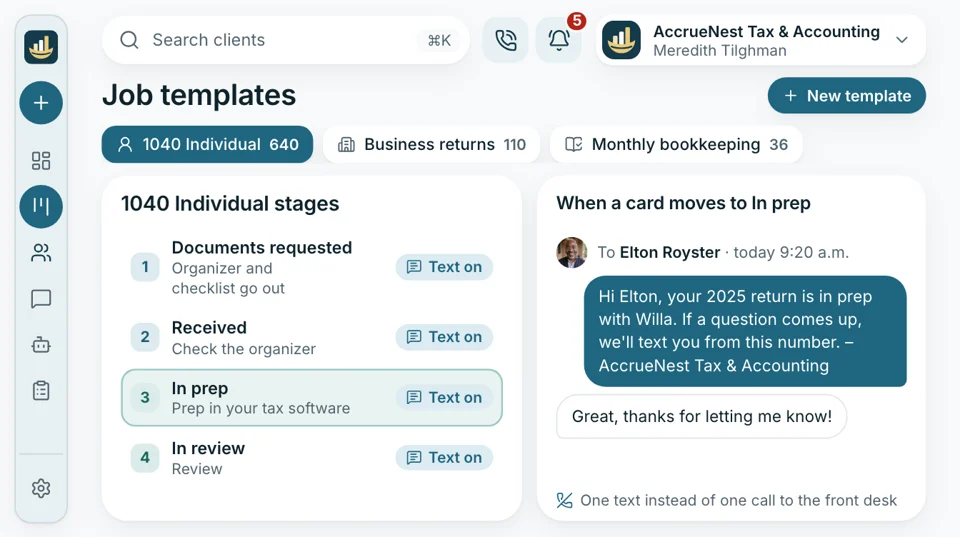
Cards go from Documents requested to Received, In prep, In review, Ready to sign, Filed and Picked up. Your staff drag each one along, and Filed is marked by whoever filed it in your tax software, so the board matches what really happened.
After a new client e-signs, their card opens here and the steps run in order: a welcome text, the intake form, the document request and the first invoice. Your office manager sees who is stuck at which step.
Clients on extension move off the April board onto the Extensions board, where each card carries an October due date. Reminders by text follow on whichever dates you pick, and the extension itself is still filed from your tax software.
When a card moves
Drag a card and the next step starts
Prep done
The reviewer gets the task
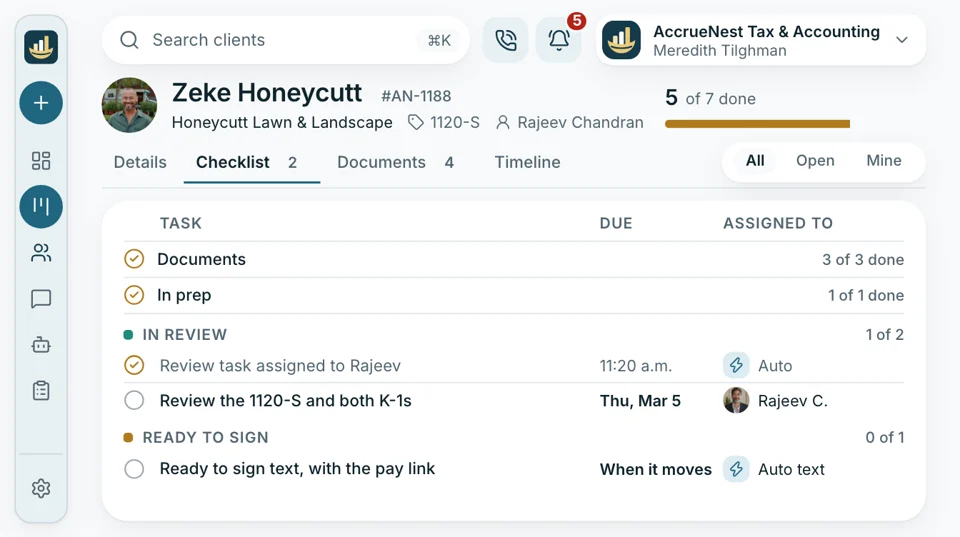
The preparer often finishes a return and mentions it to the reviewer in passing, or leaves the folder on a chair. Here, moving the card to In review assigns the review task to the person you named for that stage, with the due date already on it.
- Each stage gets its own person, picked at setup
- Reviewers see every return waiting on their sign-off today
Front desk
“Is my return done yet?”
In March that call can come ten times before lunch. Each time your staff move a return to its next stage, the client gets a text saying where it stands, which saves a phone call. That leaves the desk phone free for intro calls.
- Clients see your office number and reply to it
- Each stage's text is written once and okayed by your firm
Pick-up day
Pick-up slots booked from the text
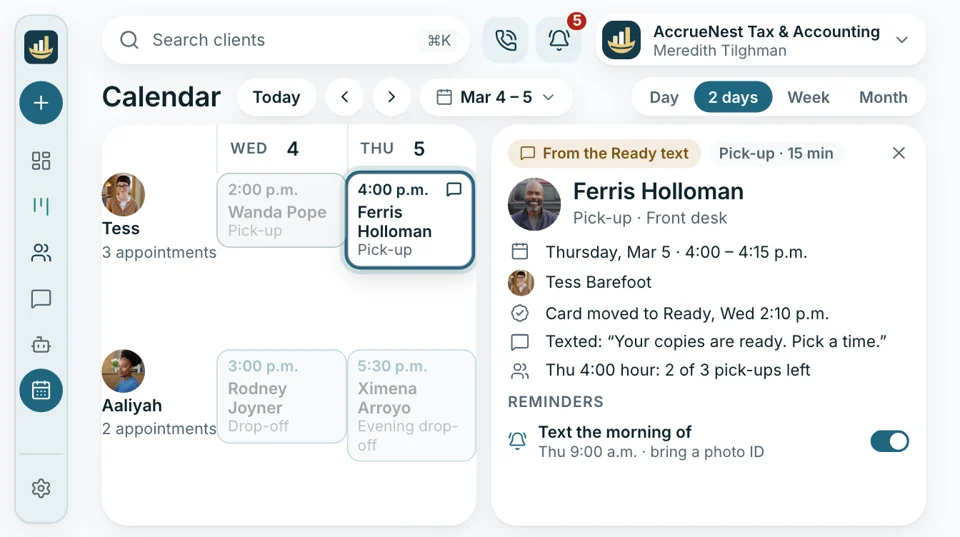
Some clients still want paper copies and a handshake at the counter. When a return moves to Ready to pick up, the client's text includes the link for pick-up slots on your calendar, so ten people don't arrive in the same hour.
- Short slots on their own calendar in season
- Drop-off days book the same way, with a reminder of what to bring
Every month
Monthly closes that open their own cards
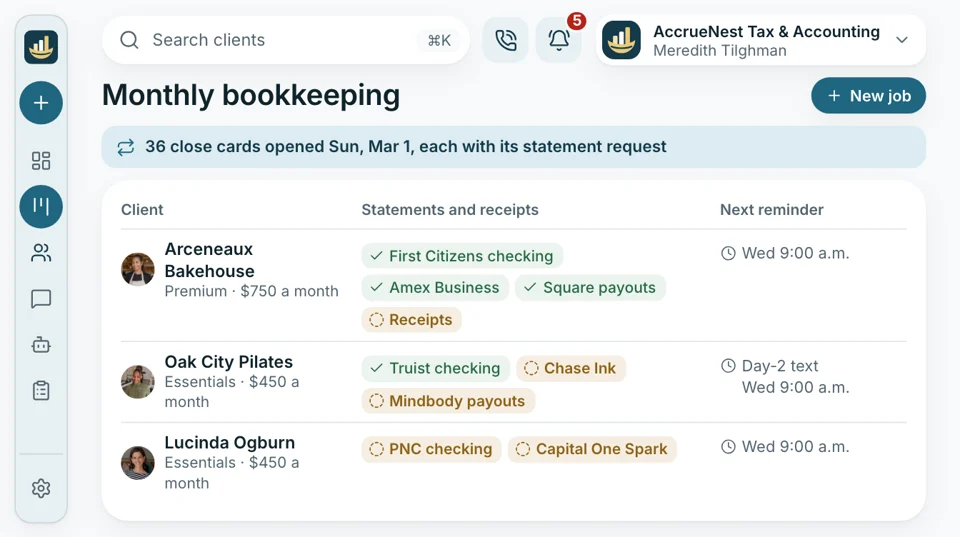
A bookkeeping client's month can't start until the statements arrive. On the date you choose, every monthly and payroll client gets a new card with its tasks, and the request for bank statements and receipts goes out with it.
- The request is resent by text on day 3, day 7, then each week
- Your bookkeepers sort the board by due date to see which clients are still behind


Also included
- Boards built with your stages
- Season dates entered at setup
- Filters by owner and stage
- Staff training at setup
- Stage texts okayed by your firm
- User roles and log
Beside it, the work around each return
The board tracks where a return stands; preparing it stays in Drake, Lacerte or whatever your firm uses now. The calls, meetings, letters and payments around each return live here, on that client's record, beside the card.

Workflow Boards for returns, monthly closes and extensions, with a client text tied to each stage you pick.
This pageWorks with the board
- Reporting Returns by stage each month, next to new clients and fees collected.
- Phones Calls land on the client's record, recorded after a notice.
- Website Your new website, written by us, files each inquiry under the service asked about.
- Consultation booking Intro calls, drop-offs and pick-ups land on your calendar, each with reminder texts.
- Ads Search and social campaigns that our team runs note on each card the ad that first brought that client in.
- Messaging Replies to any stage text land in your shared inbox, on the client's record.
- Reviews Clients who consented hear from you once after pick-up, with a link for a Google rating.
Send us your season spreadsheet
Show us how your firm tracks returns today, sticky notes included. In the demo we draw up your boards in your own stages and show the text each move would send, from $97 a month.


April, with fewer status calls

Cornelius B.Owner of a CPA firm, Columbus Zerosticky notesOur whiteboard came down in February. I check the board with my first coffee and know which returns are stuck before anyone else arrives.

Ezequiel M.Enrolled agent, San Antonio Halfthe status calls in MarchClients used to call twice a week in March. Now a text tells them their return is with the reviewer.

Annika L.Bookkeeping firm owner, Minneapolis 1stof the month, every monthEach client's card shows up on the 1st with the statement request already sent. I stopped keeping that list myself.

Marguerite D.Office manager, New Orleans 10 minutesfor the Monday meetingEvery Monday I filter by stage and see which returns have sat in review since last week. That meeting is short now.

Prakash S.Tax preparer, Edison, NJ One dragper finished returnWhen I finish a return I drag the card. The reviewer gets the task, the client gets the text, and I open the next folder.

Thuy N.Client services lead, tax office, Houston Octoberreminders sent on timeExtensions used to live in my head all summer. Now they sit on their own board, and the October reminders go out on schedule.


Workflow questions
Before you move off the spreadsheet
Type extension, stage or bookkeeping to filter.
6 questions
Is Drake or Lacerte still needed?
Yes. Your tax software and your books stay as they are, and AccrueNest works next to them. The board tracks stages and tasks; preparing, e-filing and Form 8879 never move.
Can we use the stages our firm already uses?
Yes. At setup we build each board with your own stage names, one board per service: individual returns, business returns, monthly books and payroll. When you want a stage added or renamed, we change it.
Can monthly bookkeeping jobs be created each month automatically?
Yes. On the day you pick each month, every bookkeeping or payroll client gets a new card and tasks, plus the statement request.
Do clients get a text when the stage changes?
Yes, for the stages you choose. Each one is written with you and switched on only after your okay.
Can I see which returns are stuck or overdue?
Yes. Sort and filter cards by due date, owner and stage to find what has sat too long. Due dates are entered by staff or set from season dates.
Does it handle extension season too?
Yes. Extension clients get a board of their own, each card due in October, with reminder texts on the dates your firm picks. Filing the extension still happens in your tax software, as it does today.
Others searched for
Ask about your boards
Imogen sets up your boards with you and answers anything about stages, texts or due dates.
Imogen PritchardAccount manager
Request a demo